vibeline: An emoji-first Claude Code statusline
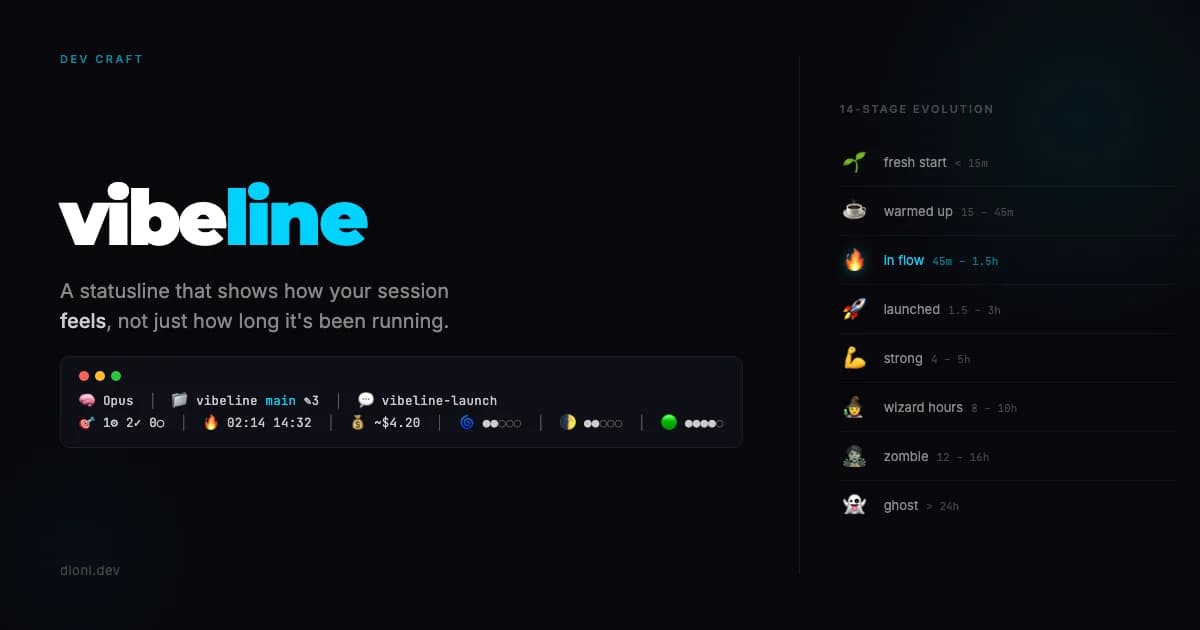
A two-line Bash Claude Code statusline that shows your session's mood. Model, git, hybrid tasks (TodoWrite + code markers), plan usage with wave and moon bars, 14-stage time emoji. v0.4.0, MIT, zero npm, single file you can read on the bus.

Dioni
Updated:
A clock does not tell you you have been coding for nine hours. It tells you it is 18:42. There is a difference.
That gap is the whole reason I code vibeline, my new Claude Code statusline.
vibeline is a Claude Code statusline written in bash that replaces flat numbers with an emoji vocabulary for model, git state, TODOs, elapsed time, cost, and context usage. A flat number is precise. It is also forgettable. At hour three of a session, I want a cue that something has shifted. That I am no longer "starting." That I am in it. Or, worse, that I should maybe step away from the keyboard before I write a migration I will regret.
The problem with flat numbers
My old statusline was honest. $2.43. 01:47:12. 142,301 tokens. All accurate. All invisible after the first hour.
The issue is not accuracy. It is that a number does not carry state. It just updates. You glance, you read, you forget. Nothing anchors the feel of the session to what you are seeing.
I got tired of it.
What shifted for me
I realized the statusline was the most persistent UI in my day. It sits there for eight, nine, twelve hours at a stretch. I stare at Claude Code all day now. It is where I built my 38-agent content agency, is bigger now xD … where I ship Hikari, where I sketch the next product. Claude Code is the dev I pair with every single day. vibeline is the tool I built for that partnership. The statusline sits there the entire time... and I wanted it to talk back to me. Not in numbers. In feel.
That piece of real estate should do more than count. It should tell me how the session is going without asking me to parse digits.
So I gave the numbers a voice. Or rather... emoji as vocabulary.
Every icon names its category. 🧠 is model. 📁 is location. 💰 is cost. 🟢 is context. The emoji is the label. No redundant text next to it. And the elapsed time emoji evolves as the session grows. That was the piece I actually wanted.
It is a small design call. But small calls compound when you stare at the thing for 10 hours a day.
What vibeline shows (v0.4.0)
Two lines. Identity on top, metrics on the bottom. Long session names no longer push anything off the right.
Line 1: identity.
Model icon with a semantic emoji (🧠 Opus, 🎵 Sonnet, 🍃 Haiku)
Folder + git with branch, dirty file count, ahead/behind
Session name whatever Claude Code has named the current session
Line 2: metrics, grouped by domain.
Hybrid task segment
🎯 1⚙ 2✓ 0○when the session has aTodoWritelist (in-progress ⚙, completed ✓, pending ○). Falls back to the 📋 code-marker counter (TODO,FIXME,XXX,HACK) when no session tasks exist.Elapsed time with a 14-stage emoji that evolves from 🌱 to 👻
Time-of-day clock with a different icon for dawn, day, evening, night
Cost meter colored by tier, with
CCSL_PLAN=maxormax20for Claude Max subscribers like meSession usage
🌀 ●●○○○ ~53%of the current 5h block, bar evolves through a wave progression (🌊→🌀→🌪→⛈️)Week usage
🌓 ●●○○○ ~51%wof the weekly quota, bar evolves through moon phases (🌑→🌒→🌓→🌔→🌕)Context bar
🟢 ●●●●○as a 5-dot visual for the window
The whole thing, live:
🧠 Opus  ·  📁 vibeline main ✎3  ·  💬 vibeline-launch
🎯 1⚙ 2✓ 0○  ·  🔥 02:14 14:32  ·  💰 ~$4.20  ·  🌀 ●●○○○ ~53%  ·  🌓 ●●○○○ ~51%w  ·  🟢 ●●●●○
Every segment is toggled by an env var. Everything shown above runs on local JSONL aggregation with a 60s async cache, so the statusline stays fast even when you are deep in a long session.

The 14 stages (the part I actually care about)
This is the piece I kept tuning for three days. The elapsed time segment is not a number. It is a small narrative.
A few key stops on the way:
🌱 under 15 minutes. Fresh start.
🔥 45 to 90 minutes. In flow.
🚀 1.5 to 3 hours. Launched.
💪 4 to 5 hours. Strong.
🧙 8 to 10 hours. Wizard hours.
🦉 10 to 12 hours. Night owl.
🧟 12 to 16 hours. Zombie.
👻 past 24 hours. Go to sleep.
There are 14 in total. The number is still there if you look at the text next to the emoji. But you feel the session before you read it. A 30-minute session and a 9-hour session should not look like the same line of text with different digits. They just should not.
That is not a feature... it is a principle.
From v0.1 to v0.4 in 48 hours
The public ship is v0.1.0 on Monday. The real version you are installing today is v0.4.0 on Wednesday. Five releases in three days. I am documenting the arc because it is the most honest thing I can say about shipping small tools.
v0.1.0 (Mon): initial public drop. Model, git, TODO radar, 14-stage time, cost, context bar. One line.
v0.1.1 (Tue, hours later): first bug in the wild was the installer, not the code.
exec < /dev/ttywas eating bash's stdin oncurl | bash. Fixed.v0.2.0 (Tue): one line was not enough. Long session names truncated the right side. Split into two lines: identity above, metrics below. The layout never breaks now.
v0.3.0 (Tue): the plan usage segment. Session and week bars that evolve through wave and moon emoji. The bars turned from 10-block to 5-dot while I was at it. Lighter visual footprint, same information.
v0.4.0 (Wed): hybrid task segment. When Claude Code has a
TodoWritelist in the session, vibeline reads it directly (🎯 1⚙ 2✓ 0○). When it does not, it falls back to the code-marker counter. The regex got tightened soCCSL_TODO_PATTERNstops matching as a false positive TODO.
Full changelog lives at github.com/zeroblack/vibeline/blob/main/CHANGELOG.md. It is a small file now. I want it to stay small.
How to install the vibeline Claude Code statusline
One line:
curl -fsSL https://raw.githubusercontent.com/zeroblack/vibeline/main/install.sh | bash
The installer drops statusline.sh into ~/.claude/, makes it executable, and offers to update settings.json for you. Restart Claude Code. Done.
On Claude Max or Pro? Add CCSL_PLAN=max and the cost shows as ~$2.45 to signal it is theoretical. Every segment is toggled by an env var. No config file, no npm chain, no runtime. Just Bash, 426 lines.
Full customization, manual install, and env var reference live in the repo: github.com/zeroblack/vibeline.
Why I am putting this online
I made it for me. If it is useful to you too, even better.
It is MIT. It is one Bash file. It has zero telemetry, zero tracking, zero analytics. I will never know you installed it unless you tell me. That is on purpose. When I went all in on my own products, the whole point was to stop building things that exploit the people using them. That principle lives in the tools too, not just the apps.
If you fork it, break it, or send a PR adding a 15th emoji stage for the 36-hour people... good. That is the whole point of shipping small things in public.
Grab it here: github.com/zeroblack/vibeline. Found a bug? Want a new stage? Open an issue. I am reading everything.
Shipped today. Still tweaking the emoji for hour 11. Apparently 🦉 is not night owl enough.